

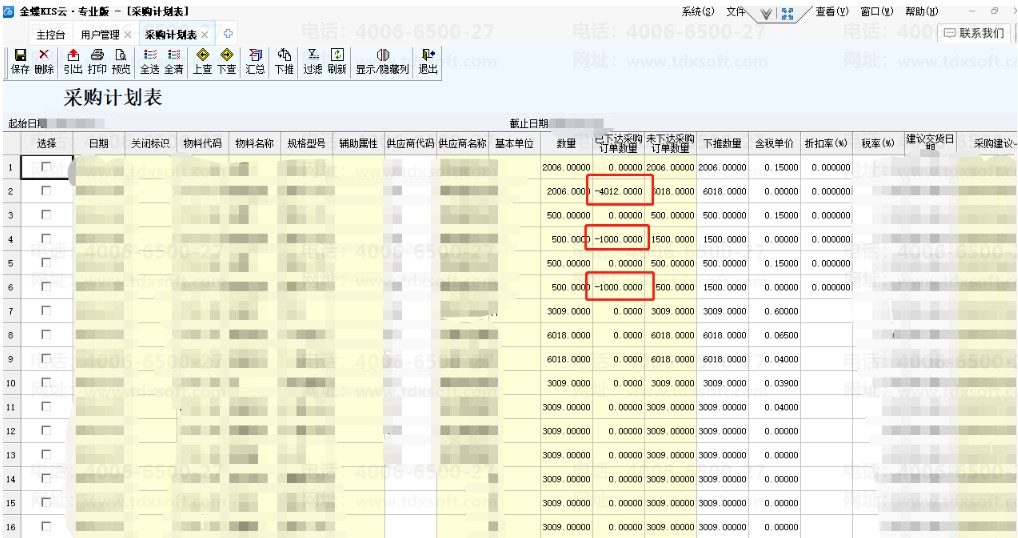
16.0金蝶专业版采购计划表部分已下达的采购订单数量显示为负数怎么处理。
服务热线:400-665-0027
新购有特价、金蝶老客户升级金蝶云产品可以享受5折优惠,送手机、送话费,好礼不断!
【问题描述】专业版16.0,采购管理 - 采购计划表,部分已下达的采购订单数量显示是负数的。如下图所示:
【解决方案】
可参考以下脚本执行处理:
update t1 set t1.FPurchaseFinishQty=isnull(t2.FQty,0),t1.FPushQty=t1.FQty-isnull(t2.FQty,0)
from PurchasePlanEntry t1
left join (Select FInterID,FPurchasePlanInterID,FPurchasePlanEntryID,Sum(FQty) as FQty
From PurchasePlanOrder
Group by FInterID,FPurchasePlanInterID,FPurchasePlanEntryID
) t2 on t1.FInterID=t2.FPurchasePlanInterID and t1.FEntryID=t2.FPurchasePlanEntryID
where isnull(t2.FQty,0)=0 and t1.FPurchaseFinishQty<0
【注意事项】
正式账套执行脚本前请先做好备份,建议待在测试账套中核实无误后再在正式账套中执行。